 Just Mail
Microsoft 365 mail, without the noise.
A small native mail client for macOS, written in Rust. It reads your Microsoft 365 mailboxes, lets you pin what still needs doing, and writes clean HTML mail with your signature. Its command line lets agents read mail and prepare drafts; sending stays with you.

Everything a mailbox needs, nothing more
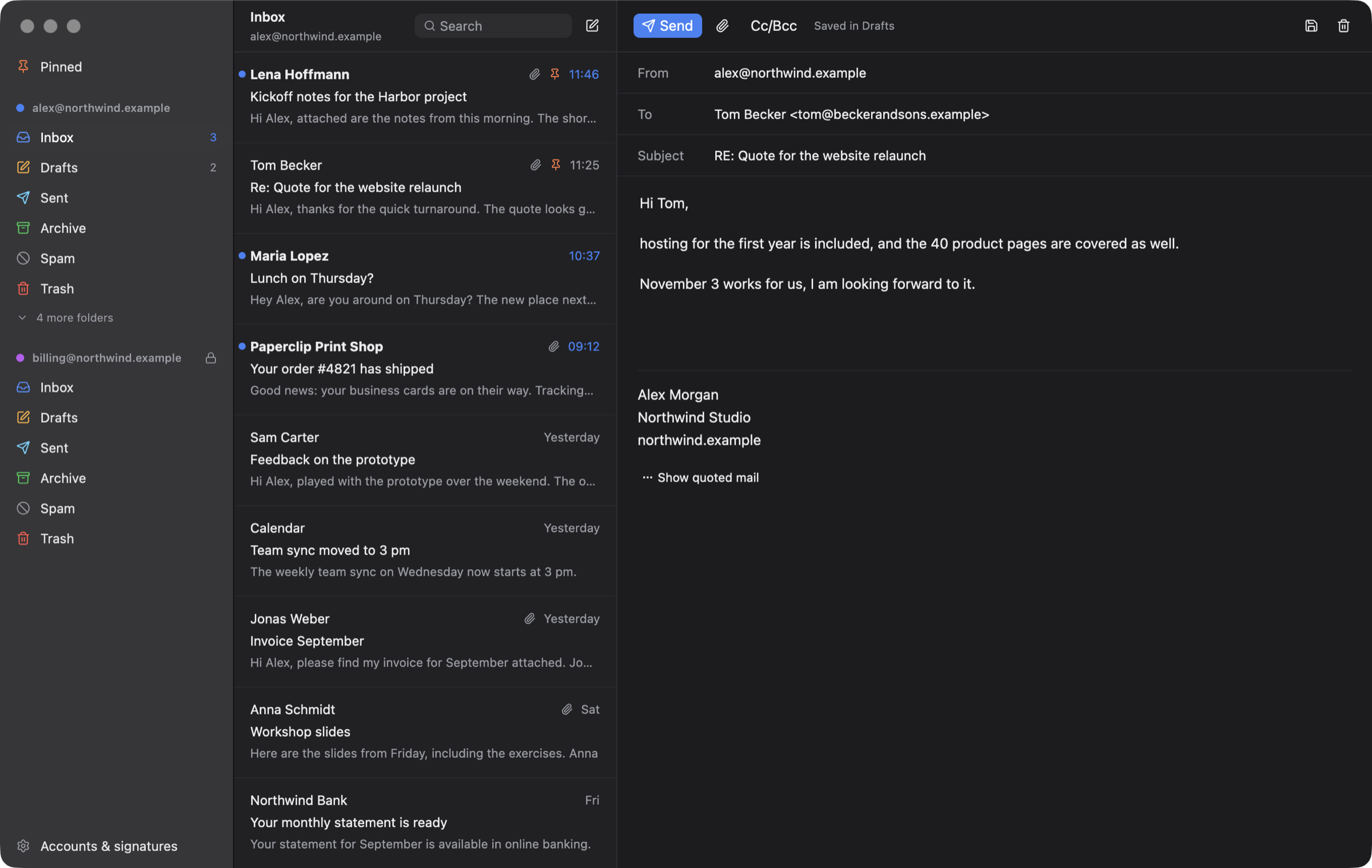
Three columns, one blue for what matters, and every mail exactly where Outlook and your phone expect it: Just Mail talks to Microsoft Graph and keeps all state on the server.
Several accounts
Each with its own folders, colour and signature. Mark an account read-only and Just Mail will never mark, move or draft anything there, handy for mailboxes another system processes.
Pin what needs doing
Pinned mail sits on top of the inbox and is the Outlook follow-up flag underneath, so Outlook, Spark and your phone agree. One view collects pinned mail of all accounts.
Real replies, clean HTML
Replies land in the conversation above the quote, as one tidy HTML block Outlook renders well. Your text is rich text with a format bar: sizes, colors, lists, links and tables, which stay as they are also when an agent wrote them in Markdown; the signature and quote are never touched. A pasted or dropped picture goes out right where you put it. Recipients are chips, suggested from the people you write to. What was already answered shows below the mail, without the quote.
Your signatures
A long one for new mail and a short one for replies, imported from Spark if you used it, logo included as an inline image so it shows up everywhere.
Quiet by default
Mail shows the way its sender designed it, but nothing in it runs, and remote images (mostly tracking pixels) stay blocked until you ask for them. Logos and pictures sent along with a mail show right away.
Native and light
Rust and GPUI; mail shows in the system's WebKit, like in Apple Mail. About 150 MB of memory, WebKit
included, and next to no CPU while it waits for mail.
Keyboard first: j/k, r, e, s, /.
An inbox your agents can work with
The jm command shares accounts with the app. It lists, searches and reads mail,
downloads attachments, pins and files, and writes drafts with your signature. A running app shows a new
draft at once, and jm open puts a mail in front of you.
Agents draft, you send. jm and its MCP server are built without the
code that sends mail, so no prompt and no setting can make them send. You review the draft in Just Mail
and press send.
Every command speaks JSON (--json), uses short ids, and has stable exit codes.
# what came in today, and what is pinned
jm list --since today
jm list --flagged

# find and read
jm search invoice --attachments
jm show a1b2c3d4

# answer in the conversation, as a draft
jm drafts reply a1b2c3d4 --markdown --body-file answer.md
jm open a1b2c3d4

# the same as tools for agents
jm mcp
Build it
Just Mail is a personal project and comes as source for now. You need macOS 13 or later and a Rust toolchain.
git clone https://github.com/mneuhaus/my-mail
cd my-mail
tools/bundle-macos.sh --install
# → /Applications/Just Mail.app and ~/bin/jm
- Open Just Mail and choose Sign in with Microsoft: the app shows a code and opens Microsoft's sign-in page.
- Add a second account the same way; set read-only and signatures under Accounts & signatures.
- On the command line:
jm accounts, thenjm --help. - Try it without an account:
tools/demo/run.shstarts the app on the made-up mailbox these screenshots show.